ChonkyChicken is a newly identified remote access trojan designed to turn one infected Windows device into a platform for credential theft, network movement, and surveillance.
The malware is part of the TAG-195, also called Golden Chickens or Venom Spider, malware-as-a-service ecosystem, which supplies tooling to financially motivated criminal operators.
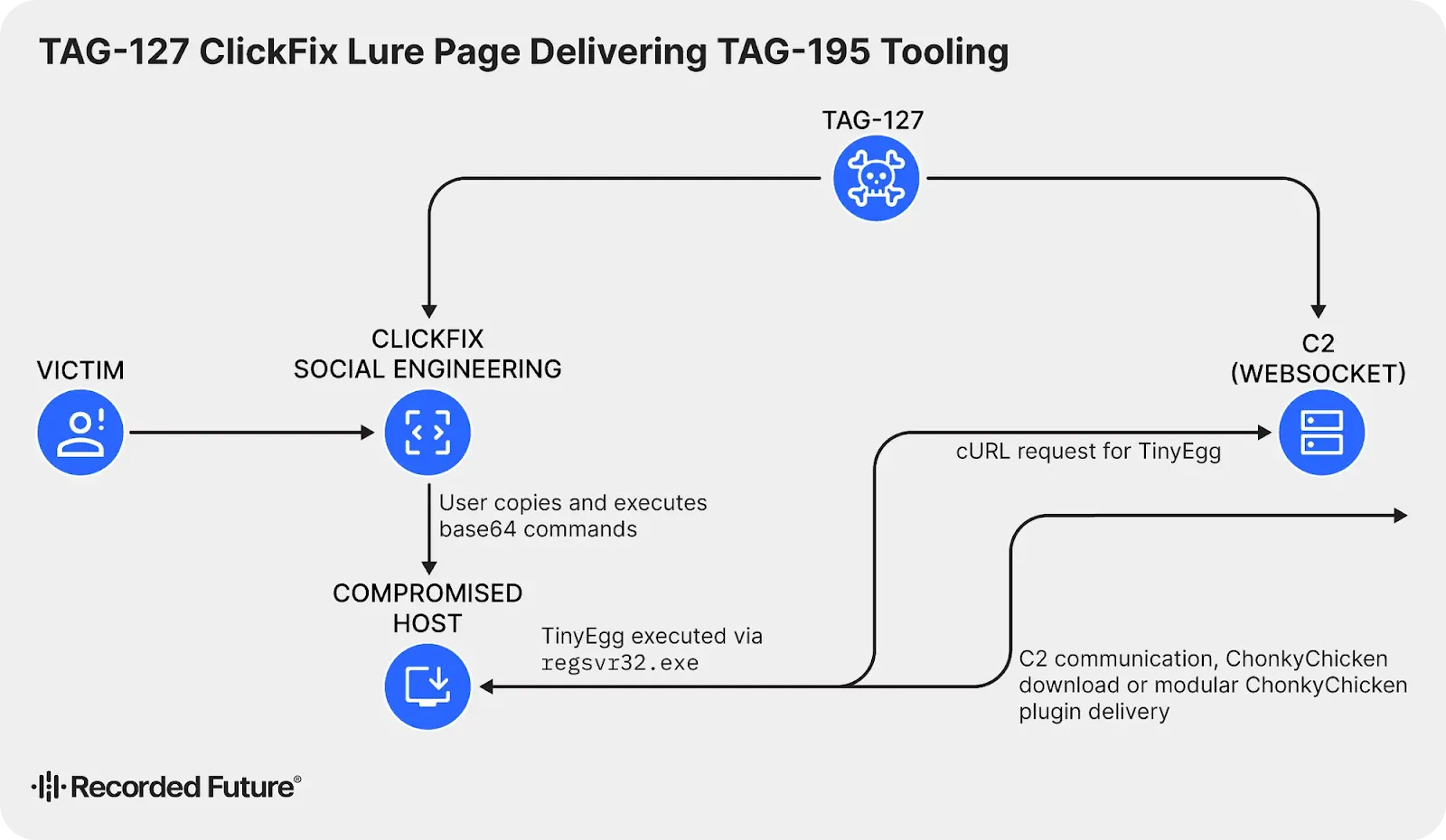
Recent campaigns begin with ClickFix lures, fake verification pages that persuade targets to paste a copied command into the Windows Run dialog.
That action downloads an OCX payload and launches it with regsvr32.exe, allowing the first-stage TinyEgg backdoor to establish access before ChonkyChicken is delivered.
Readers following ClickFix attacks using trusted tools will recognize how this technique shifts the critical action to the victim.
Analysts at Recorded Future’s Insikt Group identified the malware while tracking the evolving TAG-195 ecosystem.

Recorded Future said in a report shared with Cyber Security News (CSN) that ChonkyChicken is a second-stage implant that combines browser theft, interactive session control, remote execution, reconnaissance, and sustained monitoring in one framework.
The impact reaches well beyond a stolen password. Attackers can use browser data and active sessions to access business services, map internal systems, and move toward other devices.
The threat also reinforces why organizations need to monitor browser stored credential theft rather than treating saved passwords as a low-risk convenience.
ChonkyChicken Malware
ChonkyChicken uses a tailored helper named ChromEggscalator to bypass Chrome App-Bound Encryption protections and collect protected browser secrets.
The malware downloads the helper, places it in a temporary directory, executes it through a Windows utility, and sends the collected credential material back to its controller.
The malware can also control live Chrome or Edge sessions through Chrome DevTools Protocol automation. It launches a browser out of view with remote debugging enabled, then lets operators interact with an already authenticated session.
That means a password reset alone may not remove an attacker who still holds an active browser session. Its lateral movement features give operators several routes across a network.
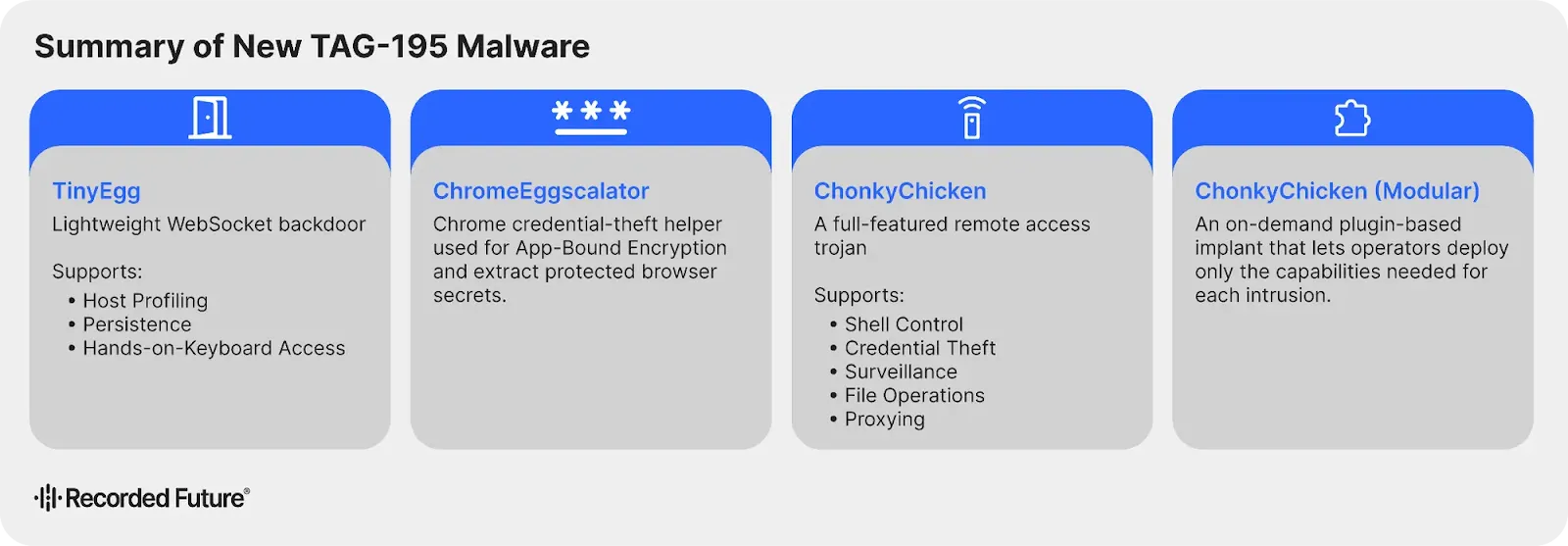
ChonkyChicken can use available credentials or access tokens, check logged-in sessions without generating authentication events, create remote scheduled tasks, scan ports, discover hosts, and identify accessible network shares.
This places ChonkyChicken in a different category from basic password stealers. The malware is built to help attackers understand an organization’s network and then use a compromised endpoint as a stepping stone.
Similar risks are seen in browser extension credential theft, where browser access can expose both credentials and active accounts.
Modular Spying and Defense
ChonkyChicken also collects keystrokes, clipboard contents, audio recordings, and screenshots, giving attackers ongoing visibility into victim activity.
A separate modular version can request at least 14 capability plugins only when they are needed, reducing the amount of malicious code initially present on a device.
All current TAG-195 families share tactics intended to complicate detection. They use filename checks to avoid running in unwanted environments, keep persistence through Windows Run keys, obscure strings, and abuse regsvr32.exe to load OCX files from user-writable locations.
Security teams should watch for regsvr32 abuse in malware, especially when it involves files in TEMP or AppData.
Defenders should restrict pasted-command execution where practical, block regsvr32.exe from loading OCX files from user-writable folders, and alert on suspicious Run key entries.
They should also investigate Chrome or Edge processes launched with remote-debugging options, monitor unusual WebSocket traffic, enforce phishing-resistant multifactor authentication, and limit administrator privileges between workstations.
Indocators of compromise (IoCs):-
| Type | Indicator | Description |
|---|---|---|
| IP address | 70.34.205.43 | Shared IP address used by observed TAG-127 ClickFix lure infrastructure |
| Domain | screenly.cam | ClickFix lure page domain |
| Domain | xtrafftrck.net | Payload staging and command-and-control domain |
| Domain | api.it195f.top | TAG-195 infrastructure domain shown in the report |
| URI path | gtgate.php | Observed controller endpoint path |
| WebSocket endpoint | ws://localhost:3000/wsagent | Observed Modular ChonkyChicken development or testing endpoint |
| File name | TEMP.txt | ChonkyChicken execution-attempt log artifact |
| File name | C.txt | ChromEggscalator operational log artifact |
| File name | xlog.txt | ChromEggscalator forensic artifact |
| File name | chromelevator.ocx | ChromEggscalator credential-theft helper file name |
| File name | mscom.ocx | ChromEggscalator execution detection artifact |
| File name | wpadcapture.ocx | WPAD helper component referenced by ChonkyChicken |
| File name | koki.ocx | Modular ChonkyChicken controller file name |
| File name | agent.ocx | Modular ChonkyChicken controller file name |
| Registry value | WinComCtl | Run key value used for persistence |
Note: IP addresses and domains are intentionally defanged (e.g., [.]) to prevent accidental resolution or hyperlinking. Re-fang only within controlled threat intelligence platforms such as MISP, VirusTotal, or your SIEM.